Guide
Retake one moment. Keep the rest of the clip.
A hand goes wrong, or a look, or a splash. You don't have to make the whole AI video again. Retake Beta remakes just the stretch of time you pick, as a new generation, and puts it over the original in your cut. It works on seconds, not on an area of the picture.
Choose the moment
Retake is in the Editor Beta, on the cut of a scene. Pick the seconds that missed, then follow four steps. Home shows them in motion.
Pick the stretch
Press Select range for retake and drag across a clip on the timeline. Or right-click a clip and choose Retake a section here…
Say what should change
The Retake panel opens. Under What should change in this section?, describe the change you want.
Set it up for review
Set up retake for review gets the price and opens the review. Nothing is generated yet.
Approve it
Tick the box and press Approve and generate. The new take goes onto a layer over the original, at the same moment.
- Fine-tune the stretch. Its edges snap to half a second, and holding Alt places them freely. A stretch can be as short as a quarter of a second. The panel also has Start and End boxes for exact times, and Play selection to watch only that stretch.
- Ask the AI for a plan, if you like. Plan with AI suggests timed beats and which of the original's files to keep. It saves and generates nothing. Set up without AI uses just what you typed.
- Only videos made in Klaboo. A video you imported can't be retaken.
What it looks like
The Retake panel in Klaboo's Editor, on a 10-second paper-cut clip: four seconds in the middle selected, where a paper plane is folded, the change written in words, and As guidance chosen for the frames. The seconds before and after stay as they are.
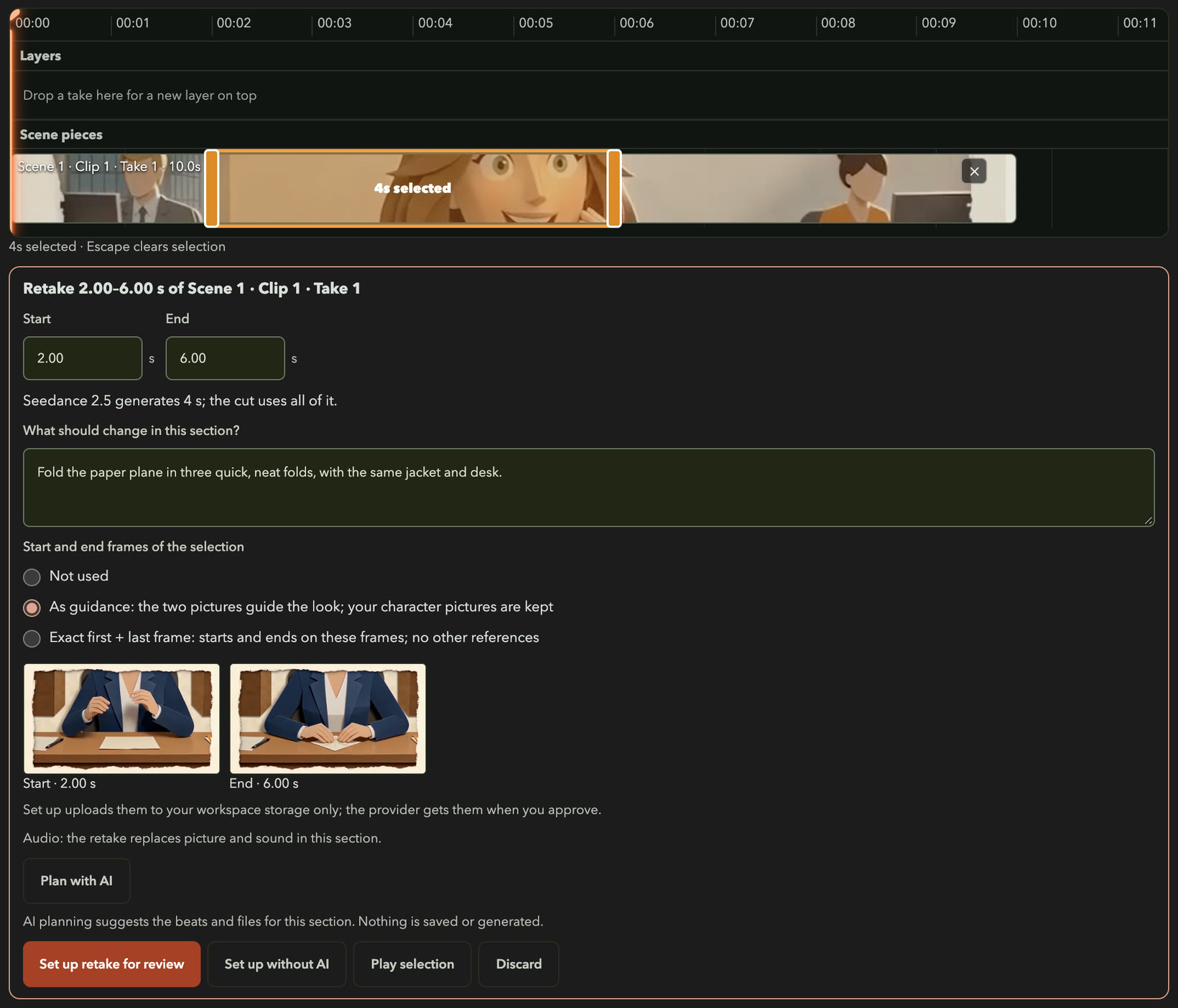
The three choices for start and end frames
- Not used. The new seconds are made from your words and the original's files only. Nothing from the original's picture at the edges of your stretch is sent, so the joins with the seconds around it are the most likely to show.
- As guidance. Klaboo takes the first and last frames of your stretch from the original and shows them, as in the picture. They go to the model with your character pictures, to guide the framing, look and light, but the new seconds don't have to start or end on exactly those frames. They use two of the model's picture slots. For most retakes in the middle of a clip, this is the one to choose.
- Exact first + last frame. The new seconds start on exactly your stretch's first frame and end on exactly its last, so both joins match. No other files go with them, so your words carry the characters. The stretch has to be whole seconds, and at least the model's shortest clip (4 seconds on Seedance 2.5); if it isn't, the panel offers to extend it. Not every provider offers this yet: the panel says when yours doesn't, and the price shown is the provider's price for first and last frames.
Taking the frames is free. They go to your own workspace storage when you set up the retake, and to your provider only with the retake you approve.
Retake is one tool for keeping a story steady from clip to clip. See how the rest fits in making an animated series.
What stays, and what may change
A retake is a new generation of that stretch. It is not an edit of the old seconds.
Stays as it is
- Your original take. The retake is a new take, so the original isn't changed or deleted.
- Everything outside your stretch. The new take covers only the seconds you picked. The rest of the cut is still the original footage.
- The settings. The retake keeps the original's provider, model, resolution, shape and sound setting. The review lists them.
- The original's files. They carry over unless you change them: Plan with AI shows each one with a tick box.
May change
- The stretch itself. What happens in it, how the characters look and move, the framing and the light can all differ from the original.
- The sound. A retake replaces the picture and the sound in its stretch.
- The join. Klaboo can't promise the new stretch lines up perfectly with the footage on either side. The frame choices help: Exact first + last frame makes it start and end on the original's frames.
No AI model can promise a pixel-identical result, so a retake can still miss. Undo takes it out of the cut, and each new try is its own generation. The FAQ answers the character question.
Price and plan
A retake is a generation like any other. Your video provider bills it at its own price, with your own key, and Klaboo adds nothing.
- The price comes first. Getting a price is free. Nothing is sent or charged until you tick the box and press Approve and generate.
- Each model has a shortest clip. If your stretch is shorter, the Retake panel says how many seconds the model generates and that you pay for all of them, while the cut uses only your stretch.
- Each retake needs its own approval. The review says so, and says the original take is kept.
- Plan with AI runs on Klaboo's own AI and counts as scene planning, which Advanced includes with fair use.
Retake a section Beta
Part of Advanced Beta. Choose a stretch and remake only that. On Basic, the entry shows with a lock.
Retake the whole clip
On Basic and Advanced. Right-click a clip and choose Retake the whole clip…, or use Generate another take in the take tray. It makes a new take from the same prompt and files, with its own price. The new take won't replace footage in your cut by itself.
Want to know what a clip, a retake and a whole scene add up to? Read what AI video costs. New to provider keys? Bring your own key explains them, and Pricing lists what each plan includes.